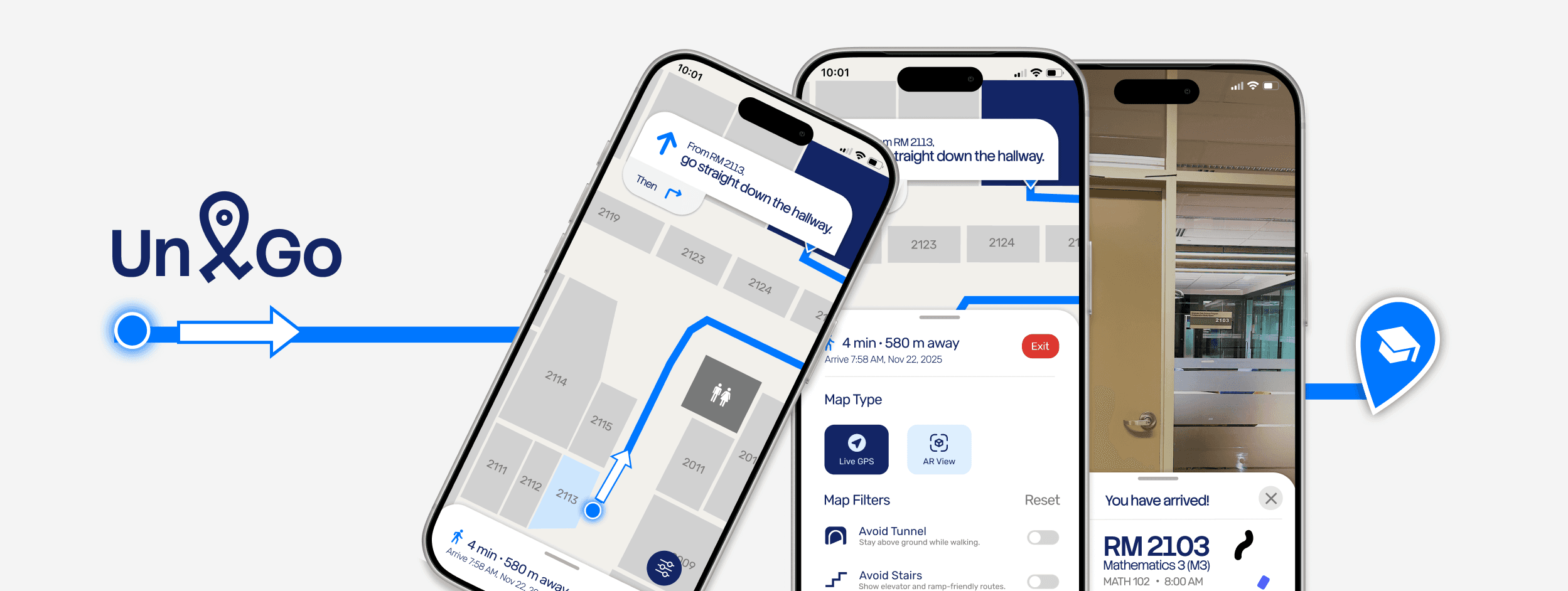
Directions to the exact classroom.
Map apps can guide students to a university building, but not to a specific room inside.
Solution
Unigo → a mobile app that gives students step-by-step directions from the entrance to their exact classroom.
Live indoor navigation
Follow the highlighted path. See your arrival time.

5 min
650 m away
Arrive 7:58 AM, Nov 22, 2025
Exit
Avoid Tunnel
Stay above ground while walking.
Show elevator and ramp-friendly routes.
Highlight washrooms, printers, study spots.
Avoid Stairs
Amenities
Map Filters
Reset
Live GPS
AR View
Map Type
After entering the building,
Ascend the stairwell to level 2.
Then
10:01
AR Navigation.
Point your phone and follow what you see.
After entering the building,
Ascend the stairwell to level 2.
Then
LEVEL 2
Stairwell
5 min
650 m away
Arrive 7:58 AM, Nov 22, 2025
Exit
Avoid Tunnel
Stay above ground while walking.
Show elevator and ramp-friendly routes.
Highlight washrooms, printers, study spots.
Avoid Stairs
Amenities
Map Filters
Reset
Live GPS
AR View
Map Type
10:01
Map or AR view. Switch anytime.
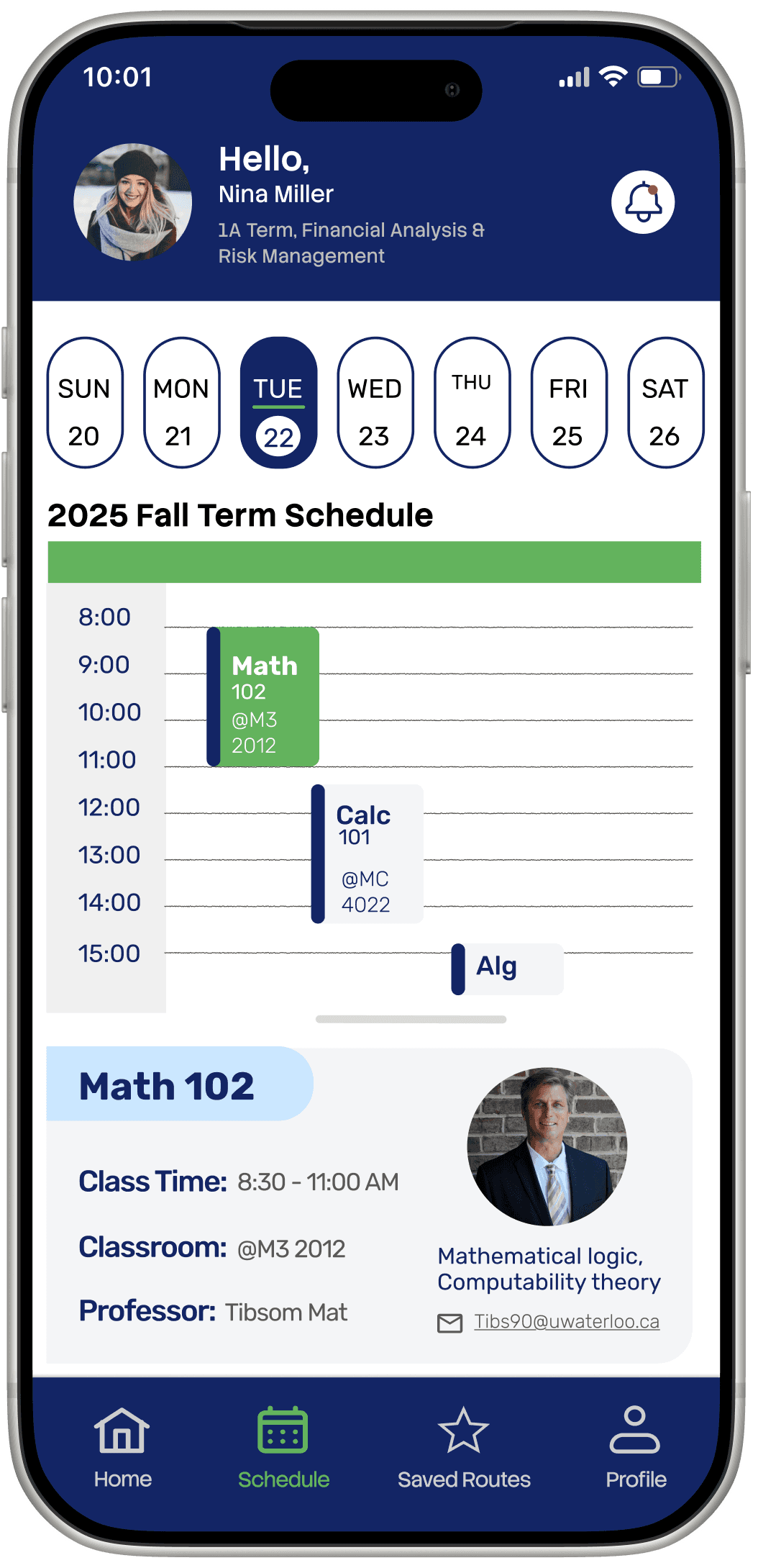
Syncs your class schedule.
Tells you exactly when to leave for each one.

MATH 102
8:00 AM
You have arrived!
RM 2103
Mathematics 3 (M3)
Up Next:
CALC 101
MC 4022
11:30AM
Rate Route
Save Route
Download Route
10:01
Confirms you're in the right class.
Queues your next one automatically.
Every participant identified indoor navigation as the most valuable feature.
→
Here's how we got there.
Designing clear directions from the building entrance to the classroom.
Timeline
8 Weeks
Role
Product Design Lead
UX Researcher
Usability Testing
Tools
Figma
Team
4 People
12
students interviewed
6
usability tests
21
screens
In a 4-person team, I owned the entire navigation experience: floor path, AR overlay, map options, accessibility filters, arrival state, and the design system across 21 screens.
Goal →
Reduce the time and uncertainty students lose finding classrooms.
Students could reach the building, but not the classroom inside it.
Map apps showed students where the building was, but not how to navigate its floors and hallways to a specific room.
70%
of respondents said navigating building interiors was the most challenging part of finding their way around campus.(GoodMaps, 2023)

“The map shows me where the building is, but not the classroom. I want it to tell me: walk 10 metres, turn left, and it’s on your right.”
— 1st-year University of Waterloo student
→ How might we guide students from the building entrance to the correct classroom?
Existing tools either stopped at the building or were not designed for students.

Everyday navigation
Outdoor routing, familiar interface
Limited indoor maps
Weak campus navigation

Campus map
Shows building locations
Static, no directions
Can't navigate indoors

Enterprise solutions
Full indoor navigation
Paid B2B
Not student-focused
Indoor navigation already existed, but the solutions we found weren’t designed for university students.
Students needed directions, arrival times, and accessible routes.
Instead of asking students to imagine a solution, we asked them about the last time they struggled to reach class.
Their experiences showed that finding the room was only part of the problem.
I began with visual directions.
Research expanded the solution to include arrival-time estimates and accessible routes.
What 12 interviews revealed.
Existing maps fail at the door.
"I finally found the building. Then I had no idea where to go."
Students need to see the route, not read it.
"Just show me where to walk. Don't make me read a map."
Navigation is a hidden time tax.
"I always leave 20 minutes early just in case I can't find the room."
Students navigate by landmark, not coordinate.
"Turn right at the stairwell, not 'head north 50 metres.'"
Four research findings shaped the final product.
What we learned
Students needed guidance to a specific room
Students checked their schedules and directions separately.
Students navigated using landmarks, not coordinates
Some students required accessible routes.
What we designed
Floor-by-floor directions with highlighted paths and landmarks.
Class schedules, routes, and arrival times in one place.
All directions use landmark language
Saved accessibility preferences applied to every route.
Why it mattered
Students could follow the route without knowing the building.
Students could see where to go and when to leave without switching apps.
Directions that match how students already think
Students received suitable directions without changing the settings each time.
We kept features that supported the journey, and removed those that did not.
Students needed to know both when to leave and where to go, so schedule integration remained part of the product.
No participant used route sharing, and the static map repeated information already available through live navigation. Both features were removed.
Route Sharing
No participant shared routes.
Static Map
Duplicates Live GPS. More load, no new value.
Social feed
Competes for attention at exactly the wrong moment.
Cognitive Walkthrough
One design system kept 21 screens consistent.
I proposed the typography, colour, and component system adopted by all four designers.
This gave the team a shared foundation and made the prototype feel like one cohesive product.
Typography
Display · Stack Sans Notch · 30px · Medium
Unigo
Primary instruction · Stack Sans · 20px · Bold
Indoor Navigation
Subheading 2 · Stack Sans · 20px · Regular
Ascend the stairwell to level 2.
Body· Rubik · 16px · Regular
5 min · 650 m away · Arrive 7:58 AM
Caption · Rubik · 14px · Light
Arrive 7:58 AM, Nov 22, 2025
Colour Palette
Primary
#132565
Route / Accent
#0077FF
Path Tint
#CCE7FF
Surface
#FFFFFF
Active / Current
#62B35C
Exit Red
#DC362E
Text Muted
#A1A1A1
Text Small
#595959
Nav Bar
Home
Schedule
Saved Routes
Profile
Navigation: Default · Active
Buttons
Start
Add stops
Buttons: Primary · Secondary
Map type toggle
AR View
Live GPS
AR View
Live GPS
Map Type: Default · Selected
Filter row
Avoid Tunnel
Stay above ground while walking.
Avoid Stairs
Show elevator and ramp-friendly routes.
Filter: Off · On
HOW I WOULD MEASURE SUCCESS
Success means reaching the correct classroom without help.
1
Task completion
Could the student enter an unfamiliar building and reach the correct classroom on their first attempt?
2
Time and wrong turns
How long did the route take, and where did the student hesitate, backtrack, or choose the wrong path?
3
Confidence at decision points
At each turn, hallway, and floor change, did the student know what to do next?
These criteria helped us prioritize schedule integration over route sharing. Schedule integration supported students before and during their journey, while route sharing did not directly improve the core navigation experience.
rEFLECTION
I would validate the prototype in real campus buildings.
Most participants were design students, and some findings relied on remembered experiences. Next, I would recruit students from several faculties and observe them finding an unfamiliar classroom in real time.
I would measure route completion, time, wrong turns, hesitation, and requests for help.

Indoor positioning remains the biggest feasibility question.
I began with visual guidance. Interviews showed that students also needed arrival-time estimates and accessible routes, while testing helped us remove features that did not support the core journey.
What I'd still question
Camera-based navigation still needs real-world testing.
The prototype assumes that Unigo can reliably identify a student’s building, floor, and indoor location. That technical capability was outside the scope of this project and would need to be validated before developing the concept further.